Key takeaways
- Treat readiness as four separate decisions.
- Verify the real sending route, not just DNS.
- Name the reply and suppression owners.
A campaign can look finished while the work that makes it usable is still missing. The copy is approved, but nobody checked the actual sending platform. The audience fits the offer, but opt-outs live in a different spreadsheet. Replies reach a shared inbox without a clear owner.
Use a readiness review before sending. Its purpose is to catch unfinished decisions while they are still easy to correct. This checklist is a proposed operating framework for B2B teams; it is not a promise of inbox placement or a substitute for recipient-provider rules and applicable requirements.
The four decisions to settle
An email program needs a suitable audience, a working sending identity, a useful message, and a person who can continue the conversation. Treat each as a separate gate. A strong result in one area does not cancel a problem in another.
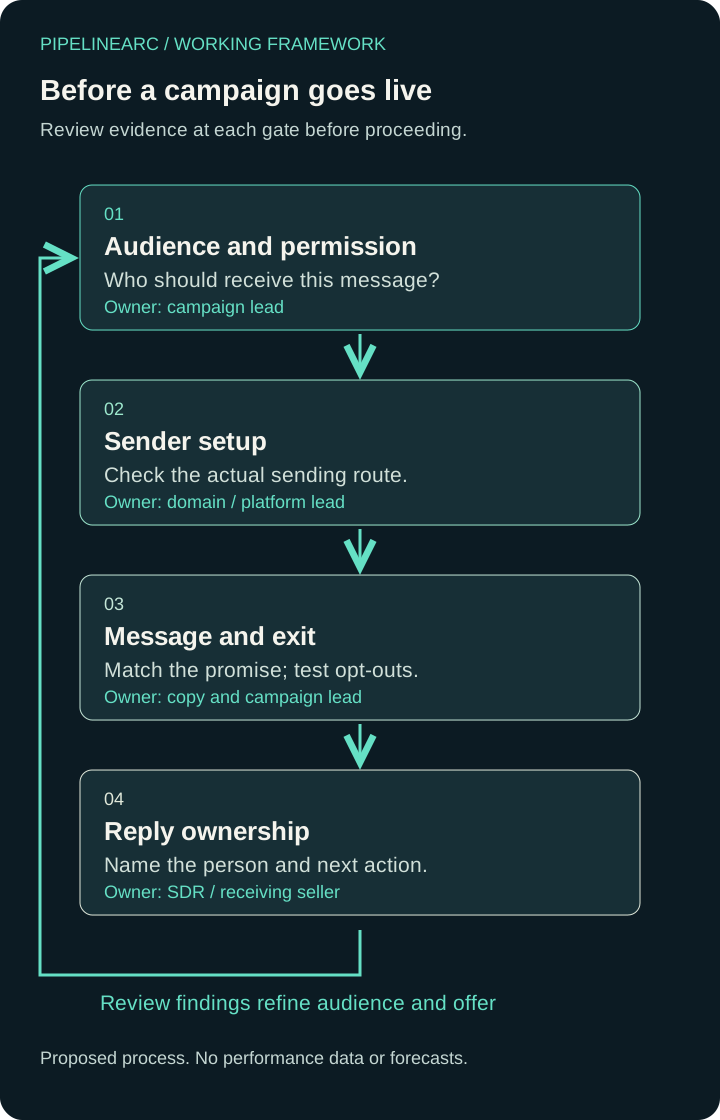
- Audience and permission
Who should receive this message?
Owner: Campaign lead - Sender setup
Check the actual sending route.
Owner: Domain / platform lead - Message and exit
Match the promise; test opt-outs.
Owner: Copy and campaign lead - Reply ownership
Name the person and next action.
Owner: SDR / receiving seller
Feedback → Audience and permission: review findings refine the audience and offer.
The diagram shows a review sequence, not a conversion funnel. There are no performance percentages because the team is checking evidence and ownership, not forecasting results.
Gate 1: Is this the right audience for this message?
Write a one-sentence audience definition that includes the business problem and the role likely to care about it. “Technology companies” is too broad to explain why this particular message should arrive. “Operations leaders evaluating how to coordinate their first outsourced sales support” gives the reviewer something concrete to inspect.
Then check where the contact records came from and why this communication is appropriate. A publicly visible address does not, by itself, establish permission. A record of a past inquiry also does not tell you that every future campaign is suitable. Record the source, relationship, relevant permissions, and the intended communication type. If that basis is unclear, resolve it before sending.
Check suppression records against the final audience, including contacts who have asked not to receive messages. Review these across every system participating in the campaign. Google recommends sending to people who want your messages; use its guidance when planning messages to personal Gmail accounts. Google email sender guidelines.
Ready evidence: the audience definition, record source, communication basis, and current suppression check can be explained by the campaign owner. An email-validation result alone does not complete this gate.
Gate 2: Has the actual sending route been checked?
List the systems that will send this campaign: the mailbox provider, email platform, and any authorized integration. A test from a personal mailbox does not establish that the campaign platform sends correctly. Ask the person responsible for the domain and platform to inspect the route you will actually use.
For personal Gmail recipients, Google distinguishes requirements for all senders from additional requirements for higher-volume senders. The latter include SPF, DKIM, DMARC, alignment, and unsubscribe requirements for relevant messages. Check the current documentation for your circumstances rather than treating this checklist as a complete provider specification. Google sender requirements.
Keep evidence from a test message sent through the campaign system to a mailbox your team controls. Message headers can help check authentication results; a DNS record existing is a different observation from a particular message passing. Google also cautions that DMARC success does not prevent a receiving organization from rejecting or quarantining a message. Google DMARC troubleshooting.
Ready evidence: the responsible technical owner has checked the actual sending route and recorded any unresolved delivery or authentication problems. Do not change domain records casually to make a test look green; other legitimate senders may depend on them.
Gate 3: Does the message make its purpose clear?
Read the subject and first paragraph together. Do they describe the same offer? Can the recipient understand who is contacting them, why the message is relevant, and what response is being requested? Remove unsupported claims, implied prior relationships, and promises the receiving sales team cannot honor.
Check every link and landing page. A message offering a short review should lead to a page that explains that review. It should not unexpectedly demand a purchase or imply that implementation is included. The offer, page, and sales response need to agree.
Test the intended opt-out route end to end and confirm who updates suppression records. Requirements vary by recipient provider and communication type; for senders covered by Google's bulk-sender requirements, relevant marketing and subscribed messages need both one-click unsubscribe support and a visible body link. Google sender requirements.
Ready evidence: the copy, destination, and opt-out path have been reviewed together. Authentication cannot make an unwanted or misleading message useful.
Gate 4: Who owns what happens next?
Decide where human replies arrive and who reviews them during the campaign. Separate a useful question, a request to stop, a delivery failure, and an automatic absence message. Each needs a different action. Do not count every incoming message as commercial interest.
Give the SDR or receiving seller the campaign promise, audience definition, and relevant page. Agree when to route an inquiry to an AE or internal seller and what context must accompany it. If coverage is unavailable, postpone the campaign or narrow its scope to the capacity the team actually has.
Ready evidence: a named reply owner, an agreed coverage period, a suppression owner, and a handoff rule. A shared mailbox name is not an accountable person.
A launch record you can copy
Before approval, complete these fields in your working document:
- Campaign and intended audience:
- Communication basis and audience source:
- Suppression check, owner, and date:
- Sending route and test evidence:
- Message, landing page, and opt-out review:
- Reply owner and coverage:
- SDR-to-seller handoff rule:
- Decision: ready, revise, or hold; unresolved issue and owner:
A “hold” is a useful outcome when the missing item is concrete. Resolve that item and review again. After launch, bring delivery issues, opt-outs, and the substance of replies back to the people shaping the audience and offer. That is the return path in the diagram.
Connect email to the whole pipeline
Marketing defines a relevant promise. SEO and service pages help recipients research it. Email and LinkedIn need coordinated ownership so the same person is not handled as unrelated records. SDR work develops appropriate conversations, and AE support carries accepted opportunities forward.
Use a Pipeline Review to identify the missing pieces in your email program. PipelineArc can help connect targeting, messaging, reply handling, and sales handoffs around an agreed scope. Begin with a process your team can explain and operate.
← Back to all insights