A buyer searches for a way to reduce missed sales follow-ups. Your site answers with a useful checklist. The checklist links to a service page that explains the support available. When the buyer makes an inquiry, the person responding can see which problem brought them there.
That is a workable connection between SEO and pipeline building. Each step has a job, and the inquiry arrives with enough context to continue the conversation.
Start with one audience and one service. Use the content map below to decide what to explain, where to explain it, and what should happen next. This is a planning framework, not a promise that readers will follow a fixed journey or become customers.
1. Collect questions that affect a buying decision
Ask the people handling inquiries to bring five questions buyers actually ask. Keep the buyer's wording alongside your interpretation. “We have plenty of meetings, but nobody follows up” gives you more to work with than “sales efficiency.”
Then separate three needs: understanding a problem, comparing ways to address it, and evaluating a provider. These are useful editorial categories; a search phrase alone cannot confirm someone's budget, authority, or readiness to buy.
For a team selling sales support, a problem question might be “What should happen after a discovery call?” A comparison question could be “Should our sellers handle prospecting too?” A provider question could be “What information does an outsourced sales team need before starting?” These are illustrative topics, not verified keyword-volume findings.
Google recommends content created to help an intended audience, with original value and a clear purpose. Use that as a quality check: could your buyer act on the page even if they never contacted you? Google's people-first content guidance.
2. Give each page one main job
Build the map before commissioning a list of articles. A simple starting version looks like this:
| Buyer question | Page job | Useful next step | Follow-up context |
|---|---|---|---|
| Why do follow-ups get missed? | Explain the breakdown and offer a checklist | Read the workflow guide | The workflow the reader wants to improve |
| What should a sales handoff include? | Provide a copyable handoff template | Compare support options | Current handoff and missing information |
| Should we add SDR capacity? | Explain prerequisites and tradeoffs | Read the SDR service scope | Prospecting and qualification capacity |
| What happens after qualification? | Explain opportunity development | Read the AE service scope | Accepted opportunities and follow-up needs |
| Can one partner connect these stages? | Explain responsibilities across services | Request a Pipeline Review | Which stages need support and who owns them |
The map is a proposed resource plan. It does not imply that every resource already exists on your website. An existing page can fill a row if it answers the question well; improve it before creating a near-duplicate.
Give every page a clear title, useful headings, and contextual links. Google's SEO Starter Guide explains how understandable content and descriptive links help visitors and search engines navigate a site. There is no requirement to force every exact phrase into every heading. Google's SEO Starter Guide.
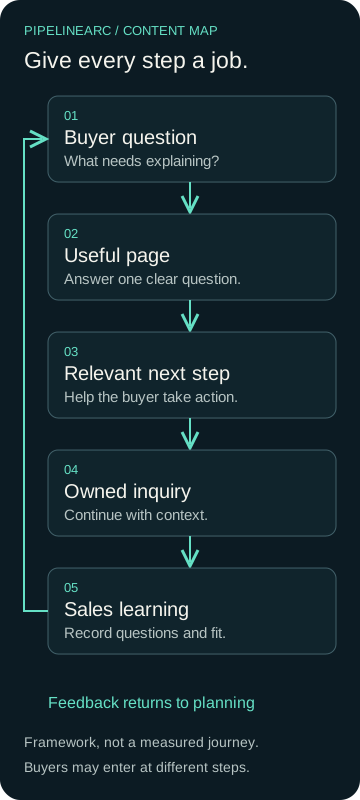
An original PipelineArc planning framework. Buyers can enter at different stages; the arrows show how the work connects, not a measured customer journey.
3. Match the next step to the page
A reader learning about handoffs may need a template before they need a meeting. A reader evaluating outsourced SDR support may be ready to discuss scope. Give each page a primary next step that fits the question it answers.
A useful service page should explain the audience, work included, prerequisites, boundaries, and likely next discussion. If an article introduces a service, link at the point where that service would help the reader act. Avoid filling every paragraph with the same booking prompt.
Keep the experience useful on a phone. A table must remain readable, the form must be usable, and the page should explain what happens after submission. A download that demands more information than it provides value can create unnecessary friction. Decide whether you need a form at all for an educational resource.
4. Define the inquiry handoff before promoting the page
Write down who receives inquiries, who covers absences, and which person owns the first response. Set a response target your team can meet. Do not advertise a deadline that nobody is responsible for keeping.
Pass along the requester's message, service interest, and any page context you can collect appropriately. Keep supplied facts distinct from your assumptions. A visit to an SDR page suggests possible interest; it does not establish a qualified opportunity.
The first response should address what the buyer said. If someone describes a follow-up problem, clarify their current process before sending a generic service pitch. Where the form lacks enough context, ask one useful question rather than restarting qualification with a long questionnaire.
5. Review search visibility and sales relevance separately
Search Console reports clicks and impressions, and lets you examine performance by query and page. Those signals help you investigate discovery; they do not tell you whether a resulting inquiry was suitable for sales. Search Console performance documentation.
Keep a second review for inquiry quality: the problem described, account fit, service relevance, and the next step agreed. Use available, authorized data. A buyer may first discover you through a colleague and later visit from an email; avoid assigning certainty to an incomplete attribution trail.
When impressions rise but useful inquiries do not, investigate the page's audience, offer, next step, and form before deciding what to change. When inquiries arrive but are regularly unsuitable, review the promise the page makes and the qualification criteria together. Neither pattern proves a single cause.
Your first working session
Choose one priority service. Collect five real buyer questions, assign a page to each, and name the next step and inquiry owner. Review the plan with someone who handles sales conversations. Schedule a follow-up to compare what buyers asked with what the pages explained.
Keep the scope small enough to implement and review. Google notes that search changes can take varying amounts of time to show effects; an editorial deadline is not a ranking deadline. SEO Starter Guide: time to see impact.
Bring your content map to a Pipeline Review. PipelineArc can help connect marketing, SEO, inquiry handling, and sales support around the same buyer questions. We will discuss where the process needs attention and which work fits your team.