Your marketing report counts inquiries. Outreach reports replies. Sales reports proposals. Each number can be accurate while the team still struggles to explain where useful opportunities lose momentum.
Build one shared scorecard that follows the handoffs between those activities. Keep channel reports for diagnosis, and use the scorecard to decide what the team should investigate next.
The template below is for a B2B team connecting marketing, SEO, email, LinkedIn, SDR work, and AE follow-up. It does not prescribe a universal conversion target. It gives each number a definition, an owner, and a practical question.
1. Agree what one record represents
Choose the unit before counting it. A contact, a company, a meeting, and a deal are different things. Three people from one company can generate three form submissions and one opportunity. Adding them together will inflate the story.
For a simple account-level review, count each company once within a defined buying initiative. Keep contact activity underneath that record. If one company can have multiple independent opportunities, document that exception and use deal-level reporting for the opportunity section.
Write the stage definitions in plain language. In this example, “fit confirmed” means the team has checked the agreed account and service criteria. “Opportunity accepted” means a seller has accepted ownership of a specific potential engagement and recorded a next step. A meeting booking alone does not meet that definition.
CRM terminology varies. HubSpot, for example, distinguishes qualified leads from opportunities associated with deals and allows customized lifecycle stages. Use your own agreed definitions consistently instead of assuming software labels settle the process. HubSpot lifecycle stage documentation.
2. Separate this week's work from a cohort's progress
A weekly activity view asks what happened during the last seven days: inquiries received, meetings held, proposals sent, and follow-ups completed. Those events may belong to accounts that entered months apart.
A cohort view follows a fixed group from its entry period to a stated observation date. It helps you understand progression without dividing this week's wins by this week's inquiries. Give cohorts enough time for your sales cycle, and show their age whenever you compare them.
The chart below follows 40 fictional accounts that first inquired during the same four-week period. Every later stage is a subset of the previous one, and each account counts at most once at each stage. The counts show the furthest stage reached by the observation date, not the number currently sitting in each stage.
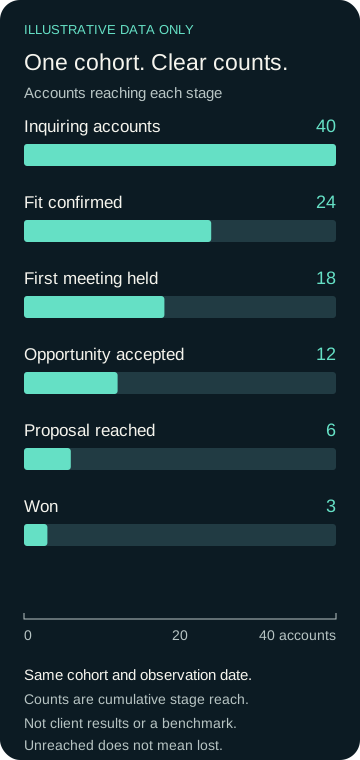
Illustrative data only. No client results, industry benchmark, or forecast. Open and disqualified records remain in the original denominator; unreached stages do not automatically mean lost accounts.
3. Use the denominator that answers the question
In this fictional cohort, 24 of 40 accounts met the fit criteria: 60%. Eighteen of those 24 held a first meeting: 75%. Twelve of the 18 became accepted opportunities: about 66.7%. Three of the six accounts that reached proposal were won by the observation date: 50%.
Those rates answer different questions. The overall observed inquiry-to-win rate is 3 divided by 40, or 7.5%. None of these numbers is a recommended target. With a small sample, a single account can change a percentage substantially.
Do not label the other three proposal accounts “lost” without checking their outcomes. They may still be open. Record won, lost, and open status separately, and avoid comparing an immature cohort with a fully resolved one as if they had equal time to progress.
4. Give the weekly review a short working template
Copy this table into your CRM report or a shared document. Add the reporting period and observation date above it. Keep account counts and event counts in separate columns if you need both.
| Review area | Record this | Proposed owner | Question to investigate |
|---|---|---|---|
| Discovery | Relevant search queries and landing pages, where available | Marketing / SEO | Are the right buyer questions bringing people in? |
| Inquiries and replies | Unique inquiring accounts; positive outreach replies separately | Marketing / outreach | Which messages create relevant conversations? |
| Qualification | Fit decision and reason; unknowns clearly marked | SDR owner | What makes a prospect suitable or unsuitable? |
| Meeting handoff | Booked, held, and returned meetings separately | SDR + receiving seller | Did the meeting happen with usable context? |
| Opportunity progress | Accepted opportunities, next action, owner, and date | AE / internal seller | Is there a buyer-agreed next step? |
| Outcomes | Won, lost, open, and reason where known | Sales owner | Which patterns should inform targeting or content? |
Treat these owners as a starting point. One person may cover several roles. What matters is that each row has an accountable person who can explain the data and take the next action.
Search Console can provide query and page discovery signals, but a search click is a different unit from an account in your CRM. Present those metrics alongside the scorecard; do not divide them into account conversion rates without a defensible measurement design. Search Console metric definitions.
5. Choose one investigation before adding more activity
A drop between fit confirmation and held meetings could reflect scheduling, timing, poor expectations, or incomplete follow-up. Review actual records before blaming a channel or a role. A percentage identifies a place to look; it does not establish the cause.
If sales returns meetings because the buyer expected a free implementation plan, compare the campaign promise with the handoff notes. If relevant inquiries wait without a response, review ownership and coverage. If proposals remain open, review the decision process and whether the buyer agreed a next step.
Write the chosen change as a testable action: “Add the agreed meeting purpose and buyer context to every handoff for the next review period.” Name an owner and review date. Record what changed so a later increase or decrease can be interpreted in context.
Leave the review with an action
Keep a short decision log: the observation, records inspected, proposed explanation, action, owner, and next review date. Bring unresolved questions back to the team. Do not turn missing information into a confident dashboard label.
Use the scorecard to improve the connection between services. Marketing and SEO explain the offer; email and LinkedIn create conversations; SDR work tests early fit; AE support develops accepted opportunities. Feedback should travel back to the people shaping the next message.
Use a Pipeline Review to map your current handoffs. PipelineArc can help define the stages, responsibilities, and support needed to move useful conversations forward. The first step is understanding where your process needs attention.